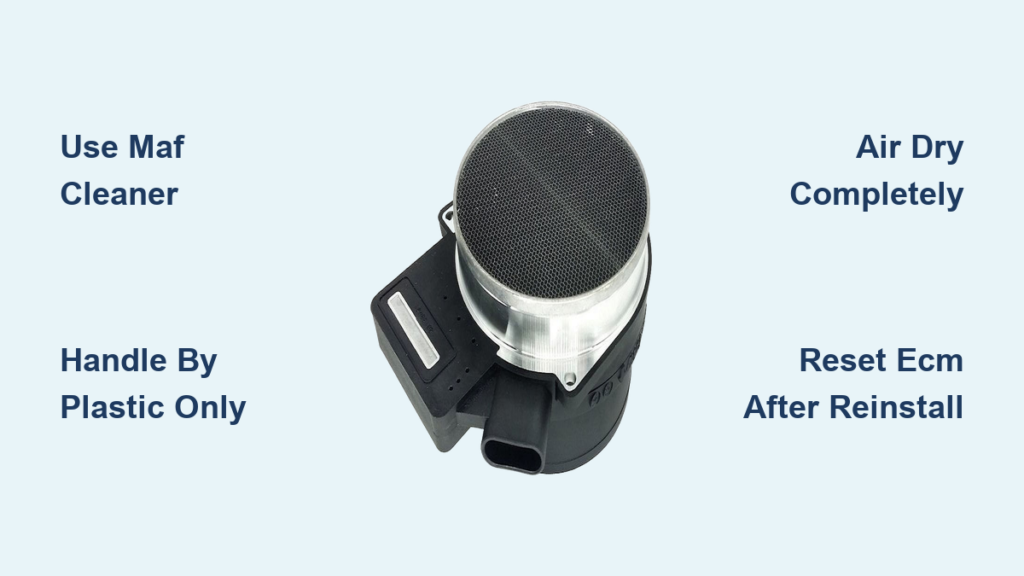
Is your Silverado idling rough, hesitating when you hit the gas, or burning more fuel than usual? A dirty Mass Airflow (MAF) sensor is one of the most common culprits behind these frustrating symptoms. This small component measures incoming air and tells your engine computer how much fuel to inject. When dust and oil coat the delicate internal wires, your truck runs rich or lean, wasting gas and power. Learning how to clean MAF sensor Silverado trucks is a quick, affordable fix that takes about 15–20 minutes and can restore lost performance instantly.
In this guide, you’ll get step-by-step instructions tailored to your model year, learn which cleaners are safe (and which will destroy your sensor), and discover when cleaning makes sense versus replacement.
Locate the MAF Sensor on Your Silverado

Find the Air Intake Housing
Open the hood and look on the passenger side of the engine bay for the large air box connected to the intake tube. On 2014–2025 models, the MAF sensor sits directly inside the intake tube, just after the air filter. On 2007–2013 models, you’ll find it as a small black rectangular unit attached to the air hose on the far left side of the main air box.
Identify the Sensor and Connector
The MAF sensor has a plastic housing with an electrical connector plugged into it. Look for two T15 Torx screws securing it in place. The wiring harness has a locking tab (red on newer models) that must be released before disconnecting. Grab a flashlight for a clear view, especially on earlier models where space is tight.
Pro Tip: Take a photo of the sensor orientation before removal. Installing it backward can cause incorrect readings.
Disconnect Power and Remove the Sensor
Unplug the Electrical Connector Safely
Before removing anything, disconnect the negative battery terminal. This resets the ECM’s adaptive memory and forces it to recalibrate to the clean sensor later. Then press the release tab on the MAF sensor’s wiring harness and pull it straight off. Never yank the wires; this can bend or break the pins. On older models, squeeze both sides of the connector to release it.
Remove the T15 Torx Screws
Using a T15 Torx bit or screwdriver, remove the two screws holding the sensor in place. One screw may be partially hidden by the intake tube, so take your time and use a ratchet with an extension if needed. Keep these screws safe; they’re small and easy to lose.
Pull the Sensor Straight Out
Gently wiggle the sensor and pull it straight out of the housing. Handle it only by the plastic edges; never touch the internal wires. These hot wires are extremely fragile and can snap with even light contact. Place the sensor on a clean paper towel in a dust-free area.
Clean the MAF Sensor With Proper Cleaner
Use Only MAF-Specific Cleaner
Spray CRC Mass Air Flow Sensor Cleaner or another residue-free, electronics-safe MAF cleaner. Never use carb cleaner, brake cleaner, or compressed air. These products can destroy the sensor’s protective coating or snap the delicate wires. The cleaner must be non-conductive and leave no film behind.
Spray 10–15 Short Bursts
Attach the straw nozzle to the can. Hold it 1–2 inches away from the sensor and spray 10–15 quick bursts directly onto the thin wires and temperature resistor inside. Rotate the sensor to hit all angles. Avoid soaking the plastic housing or electrical pins.
Never Touch or Wipe the Wires
Even a cotton swab or soft brush can bend or break the sensing elements. Let the solvent do the work. Do not blow on the sensor or use compressed air to dry it. Pressure can snap the wires instantly.
Let the Sensor Dry Completely
Air Dry for 2–10 Minutes
Set the sensor aside in a clean, dry place. The cleaner evaporates quickly, usually within 5–10 minutes. Do not reinstall until it’s fully dry. Residual moisture or solvent can cause misreads and rough running.
No Wiping or Forced Drying
Never wipe the wires with a cloth or paper towel. Avoid using a hair dryer or shop air. Heat and pressure are both damaging. Patience here prevents sensor damage and ensures accurate readings after reinstallation.
Reinstall the Sensor and Reset the System

Reinsert Sensor and Tighten Screws
Once dry, carefully slide the sensor back into the intake housing until it seats fully. Reinstall the two T15 screws and tighten just enough to secure. Over-tightening can crack the plastic housing.
Reconnect the Electrical Plug
Push the wiring harness back onto the sensor until the locking tab clicks. Ensure it’s fully seated to prevent signal loss or intermittent faults.
Reconnect Battery and Start Engine
Reattach the negative battery terminal. Turn the key to “ON” (without starting) for 30 seconds to allow the ECM to initialize. Then start the engine and let it idle for 2–3 minutes. You should notice smoother idle immediately.
Follow the Right Maintenance Schedule
Clean After Oiling Performance Filters
If you use a K&N or other oiled performance filter, wait 200–300 miles after re-oiling before cleaning the MAF. Excess oil transfers to the sensor during this period. Cleaning too soon traps oil on the wires and causes poor performance.
Clean With Every Air Filter Change
For standard paper filters, clean the MAF sensor every time you replace the air filter. This takes only a few extra minutes and prevents buildup before it affects performance.
Clean More Often in Dusty Conditions
If you drive on gravel roads, off-road, or in dry, dusty environments, clean the MAF every oil change or at least once a year. More debris means faster contamination.
Recognize MAF-Related Symptoms
Watch for These Warning Signs
A failing or dirty MAF sensor often causes:
– Rough idle, especially when cold
– Hesitation or stumbling under acceleration
– Reduced fuel economy (1–3 MPG drop is common)
– Check engine light with codes like P0101, P0102, or P050D
These issues mimic other problems, so cleaning the MAF is a smart first step before deeper diagnostics.
Check for Diagnostic Trouble Codes
Use an OBD2 scanner to pull codes. P0100–P0102 are direct MAF circuit faults. P050D (Rough Idle Cold Start) often points to MAF or throttle body contamination. Clear the codes after cleaning and monitor for recurrence.
Consider Cleaning the Throttle Body Too

Why Clean Both Components Together
The throttle body often gets dirty at the same time and causes similar symptoms: rough idle and poor cold starts. Since both affect airflow, cleaning them together maximizes performance gains.
Remove and Clean Safely
Remove the four 10mm bolts to take the throttle body off. Use throttle body cleaner (not MAF cleaner) to dissolve carbon buildup. Spray and wipe the bore and butterfly valve.
Protect the Dry Moly Coating
Look for a tacky, dark coating (dry molybdenum) around the throttle bore. This factory lubricant helps with idle sealing. Do not scrub it off; only remove black carbon deposits on top. Removing the coating can cause idle issues.
Avoid These Common Cleaning Mistakes
Never Use Carb or Brake Cleaner
These solvents are too harsh and can melt the sensor’s protective coating or damage plastic parts. Only use cleaner labeled for MAF sensors.
Don’t Touch the Internal Wires
Finger oils or physical contact can coat or break the hot wires. Always handle by the plastic housing only.
Skip Compressed Air
Blowing air, even at low pressure, can bend or snap the sensing elements. Let the solvent clean and air dry naturally.
Don’t Rush Reinstallation
Ensure the sensor is fully dry and properly seated. A loose connection or damp sensor leads to poor readings and lingering drivability issues.
What to Expect After Cleaning

Improved Fuel Economy
Most Silverado owners report a 1–3 MPG increase after cleaning a dirty MAF. Some see up to 5% better efficiency, especially in trucks with oiled filters or long intervals between maintenance.
Smoother Acceleration
Hesitation and flat spots during throttle application often disappear. The engine responds more crisply because the ECM now receives accurate airflow data.
Eliminated Rough Idle
Cold start stumbling and shaky idle at stoplights are frequently resolved, particularly when combined with throttle body cleaning.
Restored Power
While not a true power upgrade, cleaning restores 4–10 wheel horsepower lost to incorrect fuel trims. The truck feels more responsive and runs cleaner overall.
Frequently Asked Questions About Cleaning the MAF Sensor on a Silverado
How often should I clean the MAF sensor on my Silverado?
Clean the MAF sensor every time you replace a standard paper air filter. If you use an oiled performance filter like K&N, clean the MAF every oil change or at least once a year. In dusty or off-road conditions, clean it more frequently to prevent buildup.
Can I use WD-40 or brake cleaner on a MAF sensor?
No. Never use WD-40, brake cleaner, carb cleaner, or any solvent not specifically labeled for MAF sensors. These products can destroy the protective coating on the hot wires or damage the plastic housing. Use only dedicated MAF sensor cleaner like CRC.
Will cleaning the MAF sensor fix my check engine light?
It often does, especially if the code is P0101, P0102, or P050D. After cleaning, clear the codes with an OBD2 scanner. If the light returns, the sensor may be damaged and need replacement, or another issue like a vacuum leak exists.
How long does it take to clean a MAF sensor on a Silverado?
The entire process takes about 15–20 minutes, including removal, cleaning, drying time, and reinstallation. Drying alone takes 2–10 minutes, so plan accordingly.
Do I need to disconnect the battery before cleaning the MAF sensor?
Disconnecting the negative battery terminal is recommended but not required. Disconnecting resets the ECM’s adaptive memory, which helps the computer recalibrate to the clean sensor. This often results in smoother idle immediately after reinstallation.
What’s the difference between MAF sensor cleaner and throttle body cleaner?
MAF sensor cleaner is a very pure, residue-free solvent safe for delicate electronics and hot wires. Throttle body cleaner is stronger and designed to dissolve heavy carbon deposits on metal surfaces. Using throttle body cleaner on a MAF sensor can damage it.
Final Takeaways for Cleaning Your Silverado’s MAF Sensor
Learning how to clean MAF sensor Silverado trucks saves you money and restores performance in minutes. Use only dedicated MAF cleaner, handle the sensor by the plastic housing, and let it air dry completely before reinstallation. If symptoms persist after cleaning, inspect for vacuum leaks, clean the throttle body, or consider sensor replacement.
Your next step: Grab a can of CRC MAF cleaner and a T15 Torx bit, then set aside 20 minutes this weekend. Your Silverado will run smoother, get better fuel economy, and thank you with restored power.