You’re eyeing a used Chevy Silverado, perhaps a 2011 model or a recent version, and your first question is simple: how many miles has it really traveled? That odometer number reveals far more than distance. It tells you about the truck’s mechanical health, fair market value, and upcoming service needs. Yet glancing at the dashboard often isn’t enough. On many Silverados from 2011 onward, the total mileage stays hidden by default and requires a specific button sequence to reveal. And even when the number appears, is it genuine?
This guide walks you through exactly how to check mileage on a Chevy Silverado across different model years, with step-by-step instructions for both digital and analog clusters. You’ll also learn how to verify that the reading is truthful using electronic scans, paper records, and physical inspections. Whether you’re buying, selling, or simply maintaining your truck, this knowledge protects your investment and sharpens your decision-making.
Access the Digital Odometer Reading

For most Chevy Silverados from 2011 and newer, the total mileage lives in a digital driver information center and isn’t visible at first glance. You must manually trigger the display using a specific control.
Turn the Ignition to the “ON” Position
Start by turning the key to the “ON” position, which is the second notch, just before the engine cranks. Do not start the engine. If your Silverado uses push-button start, press the button once without pressing the brake pedal to activate accessory mode. This powers the instrument cluster without running the engine.
Locate the Trip Odometer Button
Find the “TRIP” or “ODO” button. On many models, including the 2011 Silverado 1500 and 2500, this sits on the left side of the steering column, near the wiper and turn signal stalks. Some newer models integrate this function into steering wheel controls or the Driver Information Center toggle.
Hold the Button for 5 to 10 Seconds
Press and hold the TRIP/ODO button continuously. After about 5 to 10 seconds, the display cycles from the trip odometer (Trip A or B) to show the total odometer reading. This number reflects every mile the vehicle has traveled since manufacture.
Pro Tip: If nothing changes, try tapping the button rapidly instead. Some models use a tap-to-cycle method rather than a long press. Always confirm the ignition is in “ON” mode.
Read the Analog Odometer Display
Older Silverado models feature a traditional mechanical odometer that remains visible without any button input.
Inspect the Speedometer Face
Look directly at the center of the instrument cluster. The odometer appears as a series of rolling numbers beneath the speedometer needle. These digits show total mileage and stay on display at all times.
Confirm the Unit of Measurement
Check whether the unit reads in miles (mi) or kilometers (km). Some trucks may be set to metric, especially if previously used in Canada or after a unit conversion. Misreading km as miles can lead to a major valuation error.
Visual Cue: A mechanical odometer should advance smoothly as the vehicle moves. Any skipping, sticking, or uneven spacing between digits may indicate tampering or mechanical failure.
Verify Mileage with Diagnostic Tools
Seeing the number on the dash is just the first step. To confirm accuracy, especially on digital models, you must cross-check with internal vehicle systems.
Scan the Engine Control Module (ECM)
The Engine Control Module (ECM) stores mileage data independently of the instrument cluster. This creates a digital backup that can expose tampering.
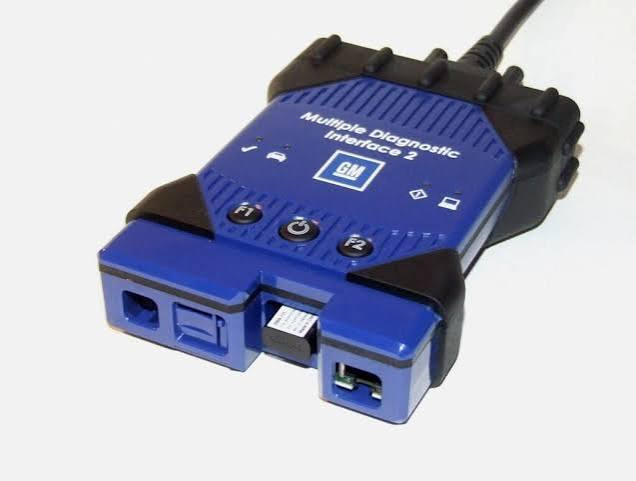
A certified technician uses an OBD2 scanner or a GM-specific diagnostic tool (such as GM MDI or Tech2) to pull mileage from the ECM. If the ECM shows 120,000 miles but the cluster displays 60,000, the discrepancy points to potential rollback or cluster replacement.
Expert Note: Cluster swaps for repairs are common and don’t always mean fraud. However, the ECM should reflect the correct history. Always request a scan when buying a used Silverado.
Cross-Check Service and Title Records
Paper trails provide historical context that the dashboard alone cannot deliver.
Review Maintenance Logs
Pull up oil change receipts, dealer service records, or third-party repair invoices. These often list the mileage at the time of service. Look for consistency: does each entry follow a logical progression?
Red Flag: A jump from 85,000 to 92,000 over two years is normal. A drop from 100,000 to 60,000 on the next receipt suggests rollback.
Examine Title History
Each state requires mileage recording during title transfers. Obtain a vehicle history report through Carfax, AutoCheck, or NMVTIS to see how the odometer has changed across ownerships. These reports flag “excessive wear” indicators and odometer discrepancies reported by DMVs.
Caution: Not all states report consistently. A clean report doesn’t guarantee accuracy, but a flagged one demands deeper investigation.
Inspect Physical Wear for Consistency
Numbers can be altered. Wear patterns cannot. Compare the reported mileage to real-world signs of use.
Evaluate Interior Components
High-mileage trucks show wear on key surfaces:
- Brake and accelerator pedals: rubber treads worn smooth
- Driver’s seat bolsters: flattened or cracked leather
- Steering wheel: shiny spots from repeated hand contact
Frequent use also degrades buttons for climate control, radio volume, and trip reset. Faded labels or unresponsive switches on a low-mileage truck signal inconsistent usage.
Mismatch Alert: A 30,000-mile Silverado with deeply worn pedals suggests heavy use or a rolled-back odometer.
Assess Mechanical and Tire Condition
Analyze Tire Tread and Age
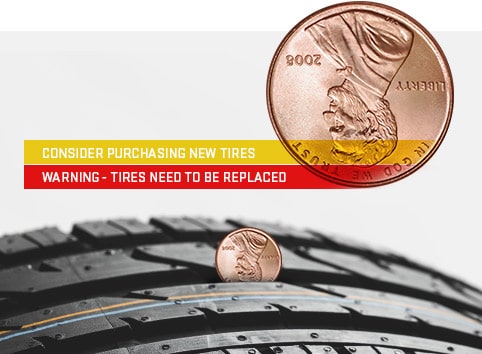
Use a tread depth gauge or the penny test:
- Insert a penny into the tread with Lincoln’s head facing down.
- If you can see the top of his head, tread depth is below 2/32 inch, meaning replacement is due.
Also check the DOT code on the tire sidewall. The last four digits indicate the week and year of manufacture (for example, “2321” means the 23rd week of 2021). Tires older than six years should be replaced regardless of remaining tread.
Correlation Check: A 50,000-mile truck should have tires showing moderate wear. Brand-new tires on a 70,000-mile truck may indicate cosmetic preparation before sale.
Diagnose Driving Pattern Effects

Not all miles are equal. The type of driving affects wear more than total distance.
City vs. Highway Mileage Impact
| Component | City Driving Stress | Highway Driving Stress |
|---|---|---|
| Brakes | High (frequent stops) | Low |
| Transmission | Moderate (shifting) | Low |
| Engine | Moderate (heat cycles) | High (continuous RPM) |
| Suspension | High (potholes, turns) | Low |
Diagnostic Clue: A 40,000-mile truck with new brakes but worn shocks likely spent most of its life in city traffic.
Detect Odometer Rollback and Fraud

Tampering still occurs, especially on older digital clusters that can be reprogrammed.
Look for Digital Anomalies
Signs of digital rollback include:
- Flickering or dim display on the instrument panel
- Reset trip meters with no matching service records
- Mismatched font or spacing in the odometer digits after cluster replacement
Tool-Based Detection: Only a professional scan can confirm whether the ECM and cluster agree. Never skip this step on high-value purchases.
Understand Low-Mileage Risks
Low mileage isn’t always better. An older truck with very few miles can harbor hidden issues.
Identify Aging-Related Failures
- Dry engine gaskets due to lack of thermal cycling
- Stale transmission fluid leading to shifting problems
- Cracked fuel lines or deteriorated seals from age rather than use
Expert Tip: A 10-year-old Silverado with only 25,000 miles needs a full fluid flush and seal inspection regardless of its odometer reading.
Schedule Maintenance by True Mileage

Accurate odometer data drives your service schedule.
Hit Key Service Milestones
Common factory-recommended intervals include:
- 30,000 miles: Oil change, brake inspection, tire rotation
- 60,000 miles: Coolant flush, transmission service, spark plug replacement
- 100,000 miles: Timing belt (if equipped), differential fluid, suspension check
Scenario: If your Silverado shows 59,000 miles, budget now for the 60,000-mile service, as it is likely overdue or imminent.
Frequently Asked Questions About Checking Chevy Silverado Mileage
Where is the odometer button on a 2011 Chevy Silverado?
On the 2011 Silverado 1500 and 2500, the trip odometer button is located on the left side of the steering column, near the wiper and turn signal stalks. It is typically labeled “TRIP” or “ODO.” Holding this button for 5 to 10 seconds with the ignition in the “ON” position reveals the total mileage.
How do I switch the odometer from kilometers to miles?
On most Silverados, you can toggle between miles and kilometers through the Driver Information Center settings. Access the menu using the steering wheel controls or the cluster toggle, then locate the “Units” option. Selecting miles changes the display accordingly.
Can the odometer on a Chevy Silverado be rolled back?
Yes, especially on older digital clusters. A technician with specialized equipment can reprogram the instrument cluster to show lower mileage. However, the ECM retains the true mileage, so a diagnostic scan can reveal the discrepancy.
Is mileage more important than the vehicle’s age?
Both matter, but they affect the truck differently. High mileage indicates wear from use, while low mileage on an older truck can signal aging components like dry gaskets and stale fluids. Always evaluate both factors together.
What is the most reliable way to verify mileage on a used Silverado?
The most reliable method combines three approaches: an ECM diagnostic scan to confirm the cluster reading, a vehicle history report to trace mileage across titles and services, and a physical inspection of wear patterns on pedals, seats, and tires.
Key Takeaways for Verifying Chevy Silverado Mileage
Knowing how to check mileage on a Chevy Silverado goes beyond pressing a button. It requires verifying truth through technology, documents, and observation. Start by retrieving the digital or analog reading, then cross-check the ECM, review service records, and inspect physical wear. These steps together ensure you see the full story, not just the number on the dash.
Before finalizing any used truck purchase, complete a full verification audit and, when in doubt, request a pre-purchase inspection from a trusted GM technician. This small investment of time can prevent costly surprises and confirm that the mileage matches the truck’s true history.