
You’re driving your Chevrolet Silverado, tap play on your favorite playlist, and—nothing. No music, no radio, no chimes. The screen shows activity, but the speakers stay silent. You’re not alone. Silverado speakers not working is a widespread issue affecting models from 2019 to 2025, impacting everything from Bluetooth audio to turn signal clicks. The problem isn’t always blown speakers. It’s often a software glitch, failing hardware, or power issue.
This guide delivers a step-by-step fix, from quick resets to advanced diagnostics, so you can restore sound fast without unnecessary dealer visits or costly guesses.
Confirm Total Audio Failure
Before troubleshooting, verify the issue isn’t isolated to one source. True Silverado speaker failure means no sound across all inputs.
- Check all sources: Test AM/FM radio, SiriusXM, USB, Bluetooth, Apple CarPlay, and Android Auto.
- Listen for system chimes: No turn signal click, door ajar warning, or seatbelt alert? That confirms a system-wide audio module failure, not just a speaker or source issue.
- Watch the screen: If the infotainment shows music playing (progress bar moves), but silence persists, the problem is likely software or amplifier-related.
🔴 Red flag: If Bluetooth works but radio doesn’t (or vice versa), suspect a source-specific glitch. But if everything is silent, proceed. This is the common software/hardware failure pattern.
Perform Steering Wheel Hard Reset
This is the #1 fix for most Silverado audio blackouts. It forces a full reboot of the infotainment system, like a “Ctrl+Alt+Delete” for your truck.
Hold the Hang-Up Button
- Turn the truck on (engine running or in ACC mode).
- Press and hold the “Hang Up” or “Decline Call” button on the steering wheel.
- Hold for 15–30 seconds.
- Watch the screen: It must go completely black, then reboot with the Chevrolet Bowtie logo.
- Release when the screen restarts.
✅ Success sign: Audio returns after reboot.
❌ Failure sign: Screen flickers but doesn’t go black. Try again, holding longer.
💡 Pro tip: If the screen doesn’t black out, you’re not holding long enough. Some systems require a full 30 seconds. Don’t release until the Bowtie appears.
Try Safe Mode Reboot
If the steering wheel reset fails, use Safe Mode to clear corrupted software processes. This option is available on MyLink and GMC Infotainment 3 systems.
Restart in Safe Mode
- Tap Settings on the home screen.
- Go to System > Reset Options.
- Select Restart in Safe Mode.
- The system reboots with minimal functions.
Exit Properly
- Turn the truck off completely.
- Open the driver’s door to trigger sleep mode.
- Close the door and wait 1 full minute.
- Restart the engine.
⚠️ Skipping the door-open step can prevent a full reset. The system needs this signal to clear temporary memory.
Disconnect Battery for Hard Reset
When soft resets fail, a battery disconnect forces all modules to reset, clearing stuck audio processes.
Step-by-Step Reset
- Turn off the truck and close all doors.
- Locate the negative (–) battery terminal.
- Disconnect it using a wrench.
- Wait 2 minutes to ensure capacitors fully discharge.
- Reconnect the terminal tightly.
- Start the engine and test audio.
✅ Why this works: The audio amplifier and infotainment module rely on stable voltage. A hard reset clears any “frozen” state caused by low power or software hiccups.
🛠️ Bonus fix: While the battery is disconnected, inspect ground connections for corrosion. Poor grounding can cause intermittent audio issues.
Pull the Radio Fuse
An alternative to a full battery disconnect, this method is quicker but equally effective for some users.
Fuse Reset Procedure
- Turn off the ignition.
- Open the passenger-side dash fuse panel (below the stereo).
- Find the radio fuse (check your owner’s manual for exact location).
- Remove it completely.
- Wait 30 seconds.
- Reinsert the fuse.
- Start the truck.
🔧 Note: This cuts power only to the radio, not the entire vehicle. It’s less disruptive but may not resolve deeper system conflicts.
Erase Infotainment Data
If resets fail, corrupted user data may be the culprit. This is a last-resort software fix that erases all settings.
Factory Reset Path
- Go to Settings > System > Reset Options.
- Select Erase Infotainment Data.
- Confirm the action.
What You’ll Lose
- Paired phones
- Saved Bluetooth devices
- Custom radio presets
- Navigation history
💬 User insight: Some owners report audio returning only after this full wipe. If the system has failed after an OTA update, corrupted data may be blocking the audio module from initializing.
Test Battery and Alternator Voltage

Low voltage is a hidden cause of Silverado speaker silence. The engine may start, but the amplifier needs stable power.
Voltage Check Guide
| Condition | Healthy Voltage | Action if Low |
|---|---|---|
| Engine Off | ≥12.2V | Replace battery if below |
| Engine Running | ≥13.0V | Check alternator if below |
How to Test
- Use a digital multimeter.
- Connect to battery terminals.
- Record voltage with engine off, then running.
🔋 Real-world case: A 2021 Sierra owner fixed temporary audio loss with a battery disconnect, only for it to return. A voltage test revealed 11.8V at rest. A new battery provided a permanent fix.
🚨 Warning signs: Slow cranking, flickering lights, or multiple electrical gremlins? Voltage issues may be systemic.
Diagnose Amplifier Failure
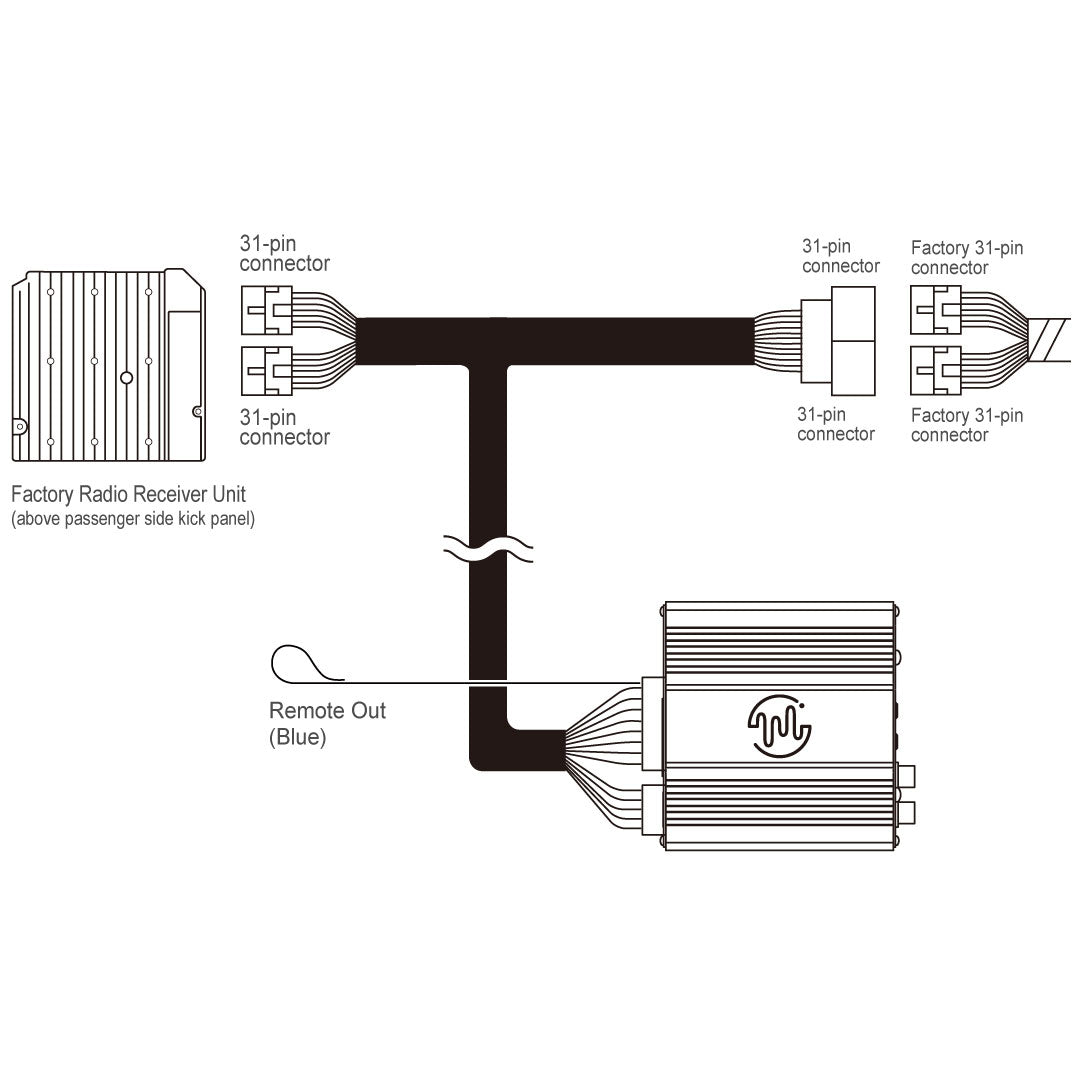
When software fixes fail, the external amplifier is a common hardware failure point.
Symptoms of a Bad Amp
- Audio cuts out intermittently, worsening over time
- Popping sound before silence
- No sound, but infotainment screen works
- Dealer replaces head unit, but the issue returns
Confirming the Fault
- Dealer scan: Request a TIS2WEB diagnostic to check for amplifier communication errors.
- Swap test: Some dealers have loaner amplifiers to test.
- Aftermarket fix: Replacement amps cost $200–$500; labor adds $100–$200.
📈 Pattern: Users report amplifier failure after 6–18 months of intermittent dropouts. If resets stop working long-term, the amp is likely dying.
Inspect for Water Intrusion
Moisture from HVAC leaks can short the audio module, especially near the center console.
Signs of Water Damage
- Popping noises from speakers
- Audio fails after AC or defrost use
- Issue worsens in humid weather
- Corrosion on module connectors
Dealer Repair (Costly)
- Water diversion mod: Dealers reroute HVAC drain lines at significant expense.
- Module replacement: Required if water damaged the circuitry.
⚠️ Skepticism alert: Some users doubt water diversion fixes the root cause. The module design may be inherently vulnerable.
Replace or Reload the Head Unit
If all else fails, the radio unit or control module may be defective.
Options
- Software Reload (Dealer): GM techs can refresh the head unit OS via TIS2WEB. No cost if under warranty.
- Refurbished Unit: Companies like ISS Automotive sell tested replacements for $300–$600.
- OEM Replacement: Most expensive at $800+ with labor.
🛠️ DIY note: A head unit swap is possible with trim tools and a wiring harness adapter. Back up radio presets first.
Document and Escalate to Dealer
For new trucks or out-of-warranty vehicles, documentation is critical.
What to Demand
- Scan for trouble codes: Use GM-specific tools, not generic OBD2.
- Test amplifier output: With a multimeter or signal tracer.
- Inspect ground points: Loose or corroded grounds cause power drop.
- Request module replacement: If software reload fails.
Warranty Strategy
- New trucks (2023–2025): Push for immediate repair under bumper-to-bumper warranty.
- Just out of warranty? Ask for goodwill repair. Some dealers will cover partial costs.
📝 User tip: Keep a log of every failure date, duration, and reset attempt. Present it to the service advisor.
Prevent Future Audio Failures
Avoid recurrence with these proactive steps.
Best Practices
- Update software at home: Don’t start driving until OTA updates finish.
- Avoid rapid power cycles: Let the system fully boot before restarting.
- Check battery health yearly: Especially in cold climates.
- Clean ground connections: Every 12 months as an easy DIY task under the hood.
🔋 Pro move: Install a battery maintainer if the truck sits for days. Stable voltage prevents module hibernation issues.
Frequently Asked Questions About Silverado Speakers Not Working
Why did my Silverado speakers suddenly stop working with no warning?
Sudden audio loss in Silverados typically stems from a software glitch in the infotainment module, often triggered by an incomplete OTA update or a brief voltage drop. A steering wheel reset resolves most cases.
Will disconnecting the battery reset my Silverado radio?
Yes. Disconnecting the negative battery terminal for 2 minutes clears temporary memory in the audio module and often restores sound. Your radio presets and paired devices may need to be re-entered afterward.
How do I know if my Silverado amplifier is bad?
Signs of amplifier failure include audio that cuts out intermittently and worsens over time, popping sounds before silence, and no sound despite a working infotainment screen. A dealer can confirm with a TIS2WEB diagnostic scan.
Can a weak battery cause Silverado speakers to go silent?
Absolutely. The engine may start normally, but if battery voltage drops below 12.2V at rest or running voltage falls under 13.0V, the audio amplifier cannot operate properly. Testing voltage is a critical diagnostic step.
Is the Silverado no-sound issue covered under warranty?
For 2023–2025 models, this issue falls under the bumper-to-warranty coverage. For vehicles just out of warranty, dealers may offer goodwill repairs if you have documented the problem thoroughly.
What’s the cheapest fix for Silverado speakers not working?
The steering wheel hard reset costs nothing and resolves the majority of cases. If that fails, a battery disconnect is free and takes only a few minutes. Both should be tried before paying for diagnostics.
Key Takeaways for Fixing Silverado Speaker Issues

The Silverado speakers not working problem is rarely about the speakers themselves. Over 90% of cases stem from software glitches or power instability, fixable with a steering wheel reset or battery disconnect. Start there. If the silence persists, escalate to voltage checks, amp testing, and dealer diagnostics.
Your next step: Try the steering wheel hard reset right now. Hold the hang-up button for a full 30 seconds, watch for the black screen and Bowtie logo, then test your audio. If sound returns, you’ve saved yourself time and money. If not, work through the voltage check before scheduling a dealer visit.



