
If your Silverado trailer lights aren’t working, especially the running or tail lights, while brake and turn signals still function, you’re not alone. This is a widespread issue across model years, particularly from 2019 onward, and affects even brand-new trucks. The primary culprit is often not a blown fuse or bad wiring, but a sensitive electronic system that cuts power when trailer amperage falls outside its narrow detection range.
Whether you’re dealing with flickering lights, a “Trailer Disconnected” warning, or total darkness on the back of your trailer, this guide provides a step-by-step breakdown to diagnose and fix the problem fast. You’ll learn how to test circuits, reset modules, apply software updates, and avoid costly dealer visits when possible.
Check Trailer vs Truck Fault

Before tearing into your truck, confirm the issue is on the Silverado side, not the trailer.
Test with a Known-Good Trailer
Connect your Silverado to a different trailer that works on another vehicle. If the lights fail here too, the fault is in the truck. If they work, the original trailer has its own wiring or grounding issue.
Use a Test Load Bulb
Plug in an old incandescent headlight or 12V test bulb directly into the running light pin (brown wire, Pin 3). Turn on parking lights. If the bulb lights up:
– The truck outputs power.
– Your original trailer’s amperage draw is too low (LEDs) or too high (incandescent overload).
This simple test reveals whether the issue is electronic compatibility, a hallmark of post-2019 Silverados with Pulse-Width Modulation (PWM) detection.
Inspect Fuses and Power Flow
Fuses are the first hardware point to check, but don’t assume a good fuse means everything’s fine.
Locate Trailer Running Light Fuse
In most Silverados (2012–2024), the Trailer Park or Trailer Running Lights fuse is a 15A or 20A blade fuse in the X50A under-hood fuse block. For 2020 models, it’s labeled F41UA.
Use a fuse tester or multimeter to check for continuity. Replace if blown.
Test for Voltage at the Fuse
Even with a good fuse, power might not reach downstream. Set your multimeter to DC voltage and probe both sides of the fuse with parking lights on.
- 12V on both sides? Power is reaching the fuse.
- No voltage? There’s an upstream issue, possibly the X4 connector or power feed.
If the fuse blows again after replacement, a short circuit exists, either in the truck’s harness or the connected trailer.
Diagnose X4 Connector Issues

For 2020+ Silverado 1500s, the X4 connector is a leading cause of trailer running light failure.
Find the X4 at X50A Block
Open the hood and locate the X50A fuse block. At its base is a 44-cavity connector (X4). This feeds power to trailer relays and modules.
Over time, moisture, vibration, or poor seating can break contact.
Disconnect, Clean, and Reseat
- Turn off the truck and disconnect the battery negative.
- Unplug the X4 connector.
- Spray with electrical contact cleaner.
- Inspect for bent pins, corrosion, or debris.
- Reconnect firmly until it clicks.
Many users report instant success after reseating this plug, with no parts needed.
Test Trailer Plug Voltage
Use a multimeter or circuit tester to verify output at the 7-pin connector.
Probe Pin 3 (Brown Wire)
With parking lights on, test Pin 3 on the 7-way connector. This is the running light circuit.
- No voltage? Fault is upstream, whether fuse, X4, or module.
- Voltage present but lights off? Amperage mismatch or trailer-side issue.
If all pins show no power, suspect a blown main fuse or failed Trailer Lighting Control Module (TLCM).
Fix Amperage Detection Problems

Modern Silverados use PWM (Pulse-Width Modulation) to detect trailer presence by monitoring current flow. If draw is too low or too high, the system shuts off.
Why LEDs Cause “Trailer Disconnected”
LED trailer lights draw 5–10 amps less than incandescent bulbs. The TLCM may interpret this as “no load” and disable the circuit.
Result: Lights flash once when connected, then go dark. Dashboard shows “Trailer Disconnected” or cycles between states.
Why Incandescents Can Fail
Old-school trailers with multiple incandescent bulbs may draw over 20 amps, more than the module allows. The system sees this as a short circuit and cuts power.
Apply TSB N192213550 (Critical Fix)
GM issued Technical Service Bulletin N192213550 to resolve this exact issue on 2019–2020+ Silverados.
- Fix: Reprogram the Trailer Lighting Control Module.
- Effect: Widens acceptable amperage range, supporting both LEDs and higher-draw trailers.
- How: Visit a GM dealer. They use GDS2 software to flash the module.
Many owners report this fix eliminates flickering and false disconnects permanently.
Install Load Resistors as Bypass
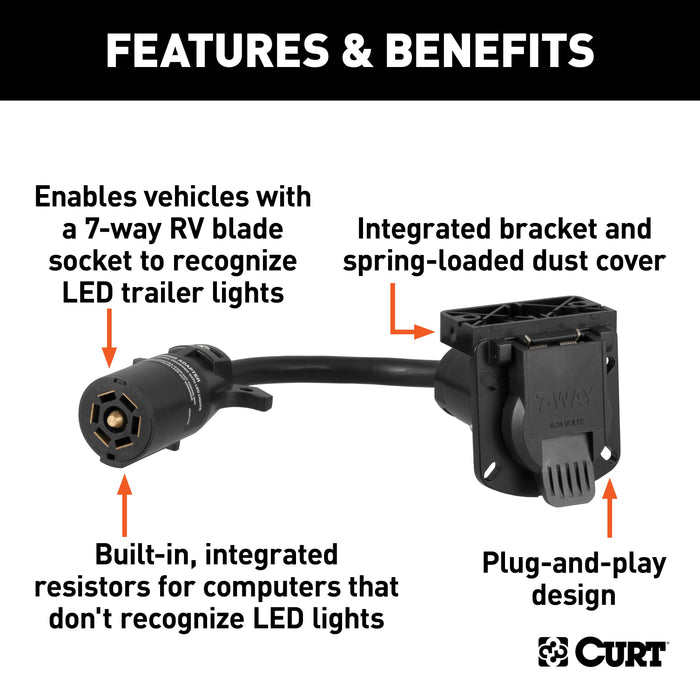
If you can’t visit a dealer yet, simulate proper load with resistors.
Use Curt #57003 or Equivalent
The Curt #57003 adapter includes built-in load resistors that mimic incandescent draw.
- Plug into your Silverado’s 7-pin.
- Connect trailer to the adapter.
- Resistors trick the TLCM into seeing correct amperage.
This works for LED trailers causing low-draw issues.
DIY Resistor Installation
For permanent setups:
– Install 6-ohm, 50-watt resistors on running light circuit.
– Wire in parallel between power and ground.
– Mount securely away from flammable materials.
Resistors generate heat, so ensure proper ventilation.
Replace Trailer Lighting Control Module
If fuses, connectors, and software don’t fix it, the TLCM itself may be faulty.
Locate the Module
The module is typically mounted near the spare tire, behind the rear bumper.
On some models, you’ll need to lower the spare tire to access it.
Swap and Test
The module is plug-and-play:
1. Disconnect battery.
2. Unplug old module.
3. Install new OEM or compatible unit.
4. Reconnect battery.
Warning: A new module may still require TSB N192213550 reprogramming to work with your trailer type.
Improve Grounding Connections
Poor grounding causes flickering, false disconnects, and partial circuit failure.
Bypass the Hitch Ball Ground
Don’t rely on the trailer hitch ball for grounding.
Instead:
– Run a dedicated white ground wire from the trailer frame to the truck’s chassis or battery negative.
– Use at least 10-gauge wire and clean metal-to-metal contact.
This simple mod resolves erratic behavior in over half of reported cases.
Check Truck-Side Ground
Inspect the ground wire at the 7-pin connector. Look for:
– Corrosion
– Loose terminals
– Paint or rust under mounting points
Clean and tighten all connections.
Reset System and Relearn Trailer Profile
Sometimes the truck just needs a fresh start.
Perform a Hard Reset
- Turn off the Silverado.
- Unplug the trailer.
- Disconnect the positive battery terminal.
- Touch it to the negative post for 10 seconds to discharge capacitors.
- Reconnect and restart.
This clears temporary faults in the BCM and TLCM.
Recreate Trailer Profile
In the truck’s infotainment system:
1. Go to Settings > Trailering.
2. Delete the current trailer profile.
3. Change trailer type (e.g., to Car Hauler).
4. Reconnect the trailer.
5. Let the system re-detect and re-learn the load.
This forces the computer to re-evaluate the circuit and can restore power.
Model-Year Specific Fixes
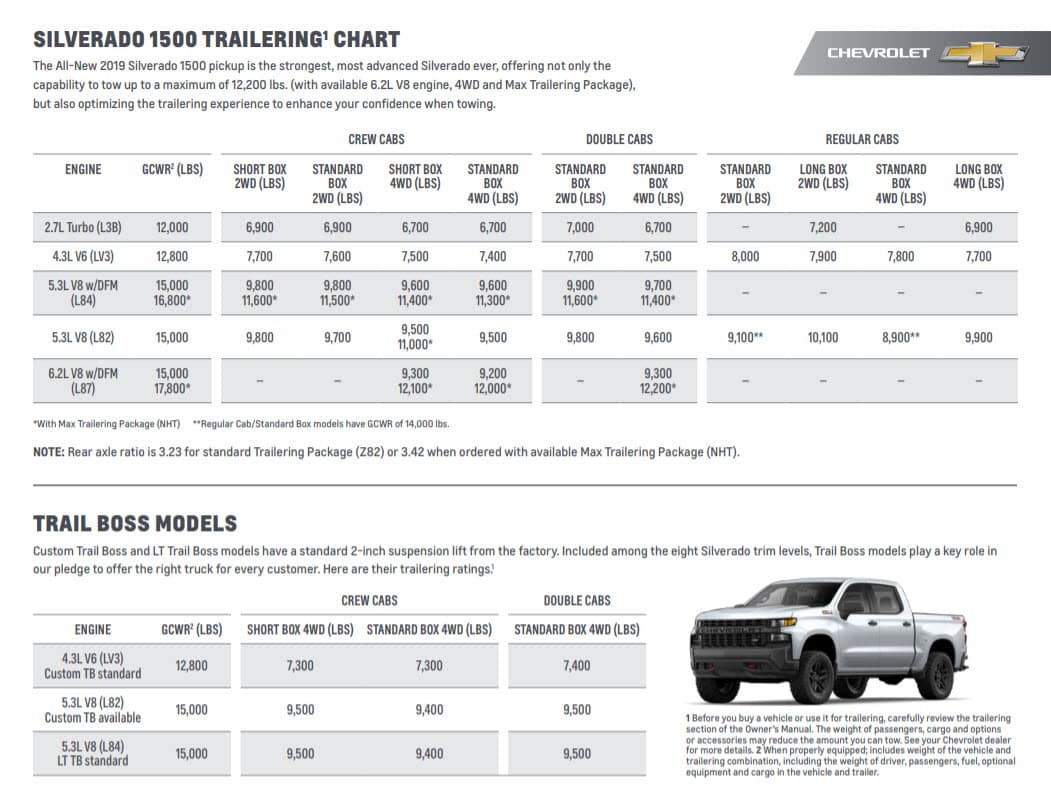
Solutions vary by year. Know what applies to your truck.
2012–2018: Focus on Fuses and Wiring
- Check 15A Trailer Park fuse.
- Inspect wiring near spare tire for chafing.
- Test for shorts in the harness.
- Less likely to need software updates.
2019–2020: Reprogram Required
- Most common issue: Module cuts power due to amperage sensitivity.
- Fix: Apply TSB N192213550 at dealer.
- Also check X4 connector seating.
2021+: Module Swap Often Works
- TLCM failures still occur.
- Plug-and-play replacement usually effective.
- Reprogramming less common unless using mixed lighting.
Prevent Future Failures
Avoid repeat issues with these proactive steps.
Use LED Lights with Resistors
Switch to LEDs for efficiency and longevity, but pair with load resistors if the truck doesn’t support low-draw loads natively.
Seal Connectors
Apply dielectric grease to all trailer plug contacts. This prevents moisture and corrosion.
Regularly Inspect Connections
Every 3–6 months:
– Check 7-pin and 4-pin sockets.
– Verify tightness of harness behind plug.
– Look for frayed wires near frame bends.
Frequently Asked Questions About Silverado Trailer Lights
Why do my Silverado trailer running lights work for a second then go out?
This usually means the Trailer Lighting Control Module detected an amperage problem and shut off the circuit. Either your LED draw is too low or your incandescent draw is too high for the module’s detection range.
Where is the trailer running light fuse on a 2020 Silverado?
The trailer running light fuse is F41UA, a 15A or 20A blade fuse located in the X50A under-hood fuse block. Check it with a multimeter for continuity.
What is TSB N192213550 for Silverado trailer lights?
TSB N192213550 is a GM Technical Service Bulletin that addresses improper amperage draw sensitivity in 2019–2020+ Silverados. The fix involves reprogramming the Trailer Lighting Control Module to accept a wider range of amperage.
Can I fix Silverado trailer lights without going to the dealer?
Yes, in many cases. Cleaning and reseating the X4 connector, installing load resistors (like Curt #57003), improving ground connections, and performing a hard reset can resolve the issue without a dealer visit.
What does “Trailer Disconnected” mean on my Silverado dashboard?
This message appears when the Trailer Lighting Control Module doesn’t detect the expected amperage draw from your trailer. It often indicates an LED trailer with too little draw or an electrical fault in the circuit.
Do I need to replace the TLCM or just reprogram it?
Start with reprogramming via TSB N192213550 first. If that doesn’t work and you’ve ruled out fuses, connectors, and grounding, then replace the TLCM. A new module may still need reprogramming to function properly.
Key Takeaways for Fixing Silverado Trailer Lights
Silverado trailer lights not working, especially running lights, is usually an electronic detection issue, not a wiring break. Start with fuse and connector checks, test voltage, and confirm amperage compatibility. For 2019–2020+ models, TSB N192213550 reprogramming is often the permanent fix. Combine software updates with solid grounding and proper load management to keep your trailer lights on and your haul safe.
Your next step: Grab a multimeter and test Pin 3 on your 7-pin connector with the parking lights on. That single reading will tell you whether to chase the truck’s electronics or focus on your trailer’s wiring.



