
Stuck in deep snow with your Silverado’s wheels spinning uselessly? That flashing traction control light might be the very thing keeping you stuck. While older trucks let you disable stability systems with a simple button press or fuse pull, modern Silverados work differently. Knowing the exact procedure for your model year saves time, prevents damage, and gets you moving when you need it most.
This guide covers how to disable traction control on Silverado trucks from 2007 through 2026. You’ll learn the correct 10-second hold method, why your system reactivates at 35 mph, how 4-Low mode changes everything, and which common “hacks” actually backfire on newer models.
Standard Disable Method for 2019–2026 Silverado Models

Newer Silverados use a tiered system for disabling traction and stability controls. A quick tap is not enough. You need precision and timing to fully shut down both systems.
Single Press vs. Full Hold: What’s the Difference?
One Press (Traction Control Only):
Pressing the TCS button once disables engine-based traction control. Wheel spin increases, but brake-based traction control and Stabilitrak remain active. The system still applies brakes to slipping wheels.
Hold 10 Seconds (Full Disable):
To turn off both TCS and Stabilitrak:
- Keep the vehicle in Park or Neutral.
- Press and hold the TCS button for 10 seconds.
- Wait for both TCS and Stabilitrak lights to illuminate on the dash.
- Release the button. Systems are now fully off.
Pro Tip: You may hear clicking or pumping noises from behind the dash during the hold. This is normal. The EBCM is releasing brake pressure before disengaging.
Visual Confirmation: Never Assume the System Is Off
Always confirm with dashboard indicators:
- TCS Light Only: Engine traction control off, stability systems still active.
- TCS + Stabilitrak Lights: Both systems fully disabled.
- No Lights: Systems are active.
If only one light appears after holding, repeat the process. Ensure your steering wheel is straight and the vehicle is stationary.
Speed-Based Reactivation Rules You Need to Know
Even after a successful 10-second disable, your Silverado won’t stay disabled under most driving conditions.
Reactivates Above 35 mph (Except in 4-Low)
In 2-High, 4-High, or Auto 4WD modes, Stabilitrak automatically turns back on once speed exceeds 35 mph. This happens regardless of whether you held the button correctly. The reactivation is silent, with no warning chime or message.
Real Impact: You cannot sustain high-speed drifts or perform long off-pavement slides in Auto or 4-High. At 36 mph, the system reengages and begins modulating brakes and engine power.
4-Low Mode: The True Off-Road Exception
When 4-Low is engaged, traction and stability systems stay off permanently with no reactivation at any speed. This allows full driver control for rock crawling, deep mud, or snow extraction. It is ideal for slow, technical terrain where electronic interference hinders progress.
Expert Note: Always shift into 4-Low before attempting full disable. Stop completely, shift to Neutral, then select 4LO. Do not try to engage 4LO while moving fast.
Driveline Protection: What Cannot Be Disabled
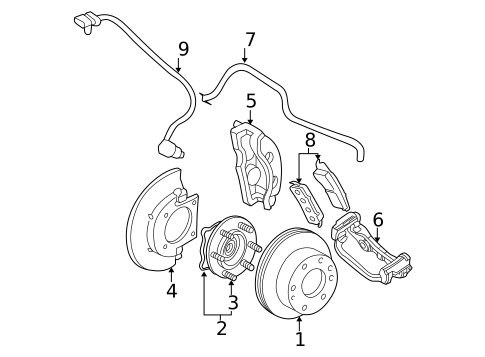
Even in 4-Low with all lights on, a background protection layer remains active.
The Persistent Driveline Protection System
This system monitors rotational speed differences between front/rear and left/right wheels. If extreme wheel speed variance occurs (such as one wheel spinning rapidly in air), it applies brakes to prevent drivetrain wind-up. It is designed to protect the transfer case and differentials during severe articulation.
Key Limitation: You cannot disable this via button, fuse, or sensor disconnect. It operates independently of TCS and Stabilitrak settings.
Some brake intervention may still occur even when systems appear off, especially on uneven terrain with mismatched tires or lifts.
Why Fuse Pulling Does Not Work Anymore
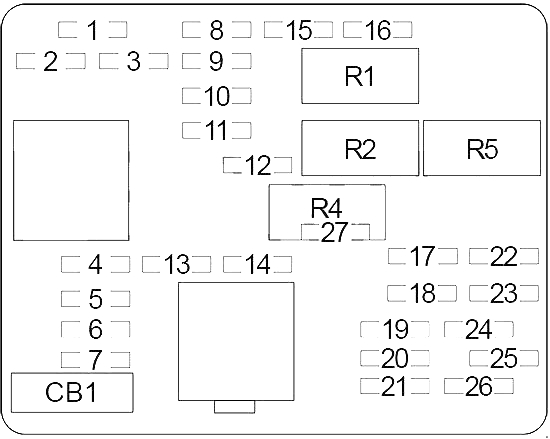
Many older truck owners assume pulling a fuse disables traction control. On 2019–2026 Silverados, this approach fails and creates serious danger.
Fuse 24 Controls the Entire Brake System
Older models (pre-2019) used a separate ABS pump fuse. On 2023+ models, no dedicated ABS or TCS fuse exists. Fuse 24 powers the Electronic Brake Control Module (EBCM), which is the brain of ABS, TCS, and Stabilitrak.
Consequences of Pulling Fuse 24:
- Brakes become extremely weak or non-functional
- Pedal may go to the floor with minimal stopping power
- Vehicle becomes unsafe to drive
Never pull Fuse 24 to disable traction control. It compromises core braking performance and creates a severe safety hazard.
Wheel Speed Sensor Disconnect: The Off-Road Hack That Fails
Some off-roaders unplug wheel speed sensors to force a system fault. On modern Silverados, this backfires badly.
What Happens When You Unplug a Sensor
Disconnecting a sensor triggers TCS, Stabilitrak, and ABS warning lights, suggesting system failure. However, within 2–3 seconds of throttle input, the 4WD system disengages unexpectedly. The truck reverts to 2WD mode even if 4-High or 4-Low was selected.
To recover, reconnect the sensor and restart the vehicle to restore 4WD function.
While this triggers warning lights, it does not create a stable “off” state. Instead, it disables 4WD reliability, making the truck unsafe for off-road use.
Troubleshooting a Non-Working Button (2007–2008 Models)
On older GMT360-platform trucks, the traction control button may be present but non-functional due to underlying faults.
Check for Diagnostic Trouble Codes First
Use an OBD-II scanner to retrieve stored codes before attempting repairs:
- C1200: Stabilitrak System Malfunction
- C1204: Steering Angle Sensor Failure
- C1215: Wheel Speed Sensor Circuit Issue
Clear codes after fixing underlying issues. Some systems will not allow disablement if active faults exist.
Critical Components to Inspect
Shifter Button Assembly
Located on the console near the gear selector. Symptoms include no click, loose feel, or no response. To fix:
- Remove console trim.
- Check wiring harness for corrosion or breaks.
- Replace the entire switch module if damaged.
Steering Angle Sensor (SAS)
Misalignment prevents the disable command from registering.
Calibration Steps:
- Park on level ground.
- Center the steering wheel.
- Use a GM-compatible scan tool (such as Tech2 or Autel MaxiCOM).
- Run the “Steering Angle Sensor Relearn” procedure.
A crooked SAS fools the system into thinking the truck is skidding, even when going straight. Do not skip this step.
Wheel Speed Sensors: Clean or Replace
Dirty or faulty sensors send bad data to the EBCM, preventing disable actions.
Inspection Steps:
- Jack up each corner.
- Locate the sensor at the hub or steering knuckle.
- Look for rust buildup, damaged wiring, loose connections, or debris blocking the tip.
Cleaning Procedure:
- Spray the sensor tip with electrical contact cleaner.
- Wipe clean with a lint-free cloth.
- Ensure proper air gap (usually 1–2 mm).
Replace the sensor if cracked, corroded, or showing an open circuit on a multimeter.
Can Software Updates Fix Disable Issues?
Yes, especially on 2008 and early T1 models.
Check for Technical Service Bulletins
Dealerships issue TSBs for known bugs such as:
- Stabilitrak refusing disable commands
- False activation during off-road driving
- Inconsistent button response
Visit GM’s official service portal or contact your dealer with your VIN to check for pending updates. Some firmware revisions improve off-road logic and delay reactivation timing.
Professional Scan Tool Override for Advanced Users
For temporary, controlled disablement, use Tech2, Autel, or Snap-on tools with GM module access. Navigate to Vehicle Dynamics, then Stabilitrak, then Force Disable. The system stays off until the next ignition cycle.
Risks to Consider:
– May void warranty if logged
– Requires expensive equipment
– Not a permanent solution
This method is best used for diagnostics or short-duration off-road events.
Performance Summary: What Really Gets Disabled?

| Action | Systems Off | Reactivates At | Safe for Off-Road? |
|---|---|---|---|
| Single Press | Engine TCS only | Immediately on slip | Limited use |
| Hold 10 Secs (2WD/4H) | TCS + Stabilitrak | 35 mph | Only below 35 mph |
| Hold 10 Secs + 4-Low | TCS + Stabilitrak | Never | Full control |
| Driveline Protect | Always active | N/A | Prevents damage |
Real-World Use Cases and Warnings
Snow and Mud Recovery
Engage 4-Low, then hold the TCS button for 10 seconds. Rock gently with no electronic braking interference. Once free, immediately re-enable systems before driving on pavement.
High-Speed Off-Road Driving
Forget it. Above 35 mph in 4-High, Stabilitrak turns back on. True freedom only exists in 4-Low.
Old vs. New: Reduced Driver Freedom
Pre-2019 owners report that earlier models allowed full disable anytime, fuse removal was safe and effective, and newer trucks prioritize safety over driver control. GM’s design choice limits extreme use but enhances daily safety.
Safety and Warranty Warnings
Risks of Disabling Traction Control
- Reduced Stability: Vehicle more likely to spin out on wet, icy, or gravel roads
- Increased Stopping Distance: ABS may also be affected during full disable
- Loss of Confidence: Unexpected slides can lead to accidents
Warranty Implications
- Button Use: Normal and covered
- Fuse Removal or Wire Cutting: Likely voids powertrain or electronics warranty
- Scan Tool Mods: Logged events may affect claims
Never disable systems for daily driving. Use only when necessary and re-enable immediately.
Frequently Asked Questions About Disabling Traction Control on Silverado
Does holding the traction control button disable Stabilitrak too?
Only if you hold it for 10 seconds while parked or in neutral. A single press only disables engine traction control. Both TCS and Stabilitrak lights must illuminate to confirm full disablement.
Why does my traction control turn back on at highway speeds?
Silverados from 2019 onward automatically reactivate Stabilitrak above 35 mph in 2-High, 4-High, and Auto modes. This is a built-in safety feature that cannot be overridden through the button alone.
Will pulling a fuse disable traction control on my 2023 Silverado?
No. On 2023+ models, there is no dedicated traction control fuse. Fuse 24 controls the entire brake system through the EBCM. Pulling it results in weak or non-functional brakes, making the vehicle unsafe to drive.
Can I disable traction control permanently for off-roading?
Only in 4-Low mode. When 4LO is engaged, the systems stay off at any speed. In all other modes, the 35 mph reactivation limit applies.
What does the driveline protection system do?
It monitors wheel speed differences and applies brakes if extreme variance is detected. This protects the transfer case and differentials from damage during severe articulation. It cannot be disabled by any user-accessible method.
Why is my traction control button not working on my 2008 Silverado?
Common causes include a faulty shifter button assembly, misaligned steering angle sensor, or dirty wheel speed sensors. Scan for DTCs (especially C1200, C1204, or C1215) and inspect these components before replacing parts.
Key Takeaways for Disabling Traction Control on Silverado
Disabling traction control on a modern Silverado requires more than a button press. It demands understanding of speed limits, gear modes, and system protections. The 10-second hold method in 4-Low gives you maximum control when you need it most, but always prioritize safety and confirm visual indicators before proceeding.
For older 2007–2008 models, start with diagnostic trouble codes and inspect the shifter button, steering angle sensor, and wheel speed sensors before assuming a system failure. Avoid fuse-pulling and sensor disconnects on any modern Silverado, as these methods compromise braking or 4WD reliability.
Your next step: Park your Silverado on level ground, center the steering wheel, and practice the 10-second hold procedure now, before you need it in an emergency. Knowing exactly what lights to look for will save valuable time when you’re stuck in mud or snow.



