
If your OnStar isn’t working in your Silverado—no remote start, dead Wi-Fi, unresponsive button, or red light—you’re not alone. A growing number of owners across 2022–2026 Chevrolet Silverado models report complete OnStar failure, often in trucks under 3 years old with less than 40,000 miles. The issue typically stems from a failed telematics module, blown fuse, or incorrect post-replacement reconfiguration.
This guide gives you the exact steps to diagnose, fix, and fight warranty denials. You will learn how to restore connectivity quickly and avoid a $1,000 repair bill.
Check the Telematics Fuse First in Your Silverado
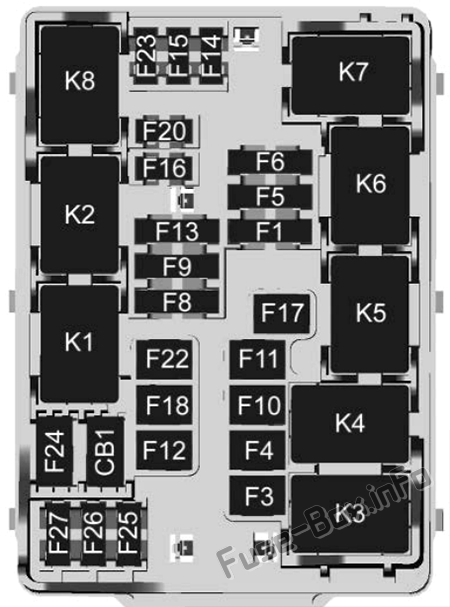
Before assuming hardware failure, verify the fuse powering the OnStar system. Many “dead OnStar” cases are simply caused by a blown fuse, especially after installing dash cams, lights, or other accessories.
Locate Fuse F12 in the Engine Bay
Go to the under-hood fuse box on the driver’s side of the engine compartment. Open the lid and check the diagram inside. Find Fuse F12, labeled as the Central Gateway Module Telematics Control Platform. This is the primary power source for your OnStar and Wi-Fi functions.
⚠️ Note: Some manuals reference “12DR,” but F12 is the correct physical fuse.
Inspect and Replace a Blown Fuse
- Pull out F12 using the fuse extractor tool in the box.
- Check the metal filament inside for breaks or dark discoloration.
- If damaged, replace it with an identical amperage fuse (typically 10A or 15A; match the rating exactly).
- After replacement, reconnect the battery if disconnected and wait 2 minutes for systems to reboot.
If the OnStar light returns and the app reconnects, the fuse was the culprit. If not, move to a full system reset.
Perform a Hard Battery Reset on Your Silverado
A deep electrical reset often resolves software locks that mimic hardware failure. This step is essential after any fuse replacement or if the system froze unexpectedly.
Disconnect the Battery for 30 Minutes
- Turn off the truck and remove the key.
- Open the hood and locate the negative terminal on the battery.
- Use a wrench to loosen the nut and disconnect the black cable.
- Wait exactly 30 minutes to clear residual memory in the telematics module and other control units.
- Reconnect the negative terminal and tighten securely.
Start the truck and allow it to idle for 5 minutes. The instrument cluster may display temporary warnings that should clear automatically. Test the OnStar button by pressing and holding for 2 seconds. If it lights up blue and gives a tone, connectivity is returning.
✅ Pro Tip: After a reset, open the Chevrolet app and try remote lock/unlock. Full restoration can take up to 10 minutes as the module re-registers with the network.
Diagnose a Failed Telematics Module in Your Silverado

If the fuse is intact and the battery reset fails, the OnStar Telematics Module itself has likely failed. This is a known issue in 2022–2026 Silverados, even in brand-new trucks.
Recognize Total Module Failure
Key signs of a dead module include:
– OnStar button is red or completely dark
– No Wi-Fi hotspot broadcast
– Chevrolet app shows “vehicle unavailable” or “no connection”
– Navigation fails to load maps or update location
– Remote start and diagnostics disabled
Unlike intermittent glitches, these symptoms persist across restarts and indicate hardware failure. The module, located behind the dashboard or under the center console, can fail due to voltage spikes, manufacturing defects, or heat exposure.
Confirm Replacement Is Needed
Only a dealership or certified GM shop can run a full diagnostic using GM’s Tech2 or GDS2 tool. Request a DTC (Diagnostic Trouble Code) scan focused on:
– U0140: Lost communication with telematics module
– U0073: CAN communication bus failure
– B2AAA: OnStar module internal fault
If these codes appear and fuse/reset steps fail, module replacement is required.
Replace and Reconfigure the OnStar Module
Replacing the module isn’t enough because reconfiguration is mandatory. Many owners report their app still not working after a “replacement” because the technician skipped this critical step.
Ensure Proper VIN Matching
After installing the new module, the technician must:
1. Connect to GM’s service portal via GM TechLink.
2. Access the Telematics Control Platform programming menu.
3. Select “New Module Installation” and enter the vehicle’s VIN.
4. Authenticate and download the correct firmware and security keys.
5. Reboot the system and verify OnStar status.
❗ Warning: Without reconfiguration, the new module won’t link to your VIN, and the Chevrolet app will remain disconnected.
Ask the service advisor: “Did you complete the full reconfiguration to VIN?” Get this step documented on the repair order.
Fight Warranty Denials for OnStar Repairs
Dealers often deny warranty coverage, blaming dash cams, mirror taps, or “customer modifications.” Don’t accept this without proof.
Cite the Magnuson-Moss Warranty Act
Under federal law (Magnuson-Moss Warranty Act of 1975), the dealer must prove that your aftermarket device caused the module failure. A dash cam installed two years ago without issues cannot suddenly fry a module unless there was a surge event.
When denied:
1. Calmly state: “Under Magnuson-Moss, you must provide evidence that my accessory caused this failure.”
2. Ask for a written failure analysis linking the dash cam wiring to the F12 fuse or module damage.
3. If they can’t provide proof, demand warranty coverage.
Escalate to Chevrolet Corporate
If the dealer refuses:
– Call Chevrolet Owner’s Assistance at 1-800-222-1020
– Reference your case number and service visit
– State: “I’m invoking Magnuson-Moss. The dealer has not proven causation for warranty denial.”
You can also email onstarcommunity@chevrolet.com with the subject: ATTN: OnStar Community/Ksap. Include your VIN, mileage, and a summary of the issue.
Prevent Future OnStar Failures in Your Silverado
Even after repair, protect your system from repeat failure.
Avoid Mirror Tap Power Sources
Never power dash cams or accessories by tapping into the rearview mirror wiring. These circuits are low-amperage and prone to overloads. Instead:
– Use a fuse panel tap (such as an OBD2 or cigarette lighter circuit)
– Install an inline fuse on any added wiring
– Have work done by a certified auto electrician
Monitor for Intermittent Wi-Fi Drops
If Wi-Fi cuts out frequently or requires re-authentication, the module may be degrading. Address it early, before total failure occurs.
Request Service Credits for OnStar Downtime
If you’re billed for OnStar or Wi-Fi services during an outage, request a refund.
Get Prorated Billing Adjustments
Contact OnStar Customer Service at 1-888-4ONSTAR (1-888-466-7827) and:
– Provide dates when services were down
– Request credit for unused subscription time
– Escalate to a supervisor if denied
Many users report success with this, especially after documented repair visits.
Frequently Asked Questions About OnStar Not Working in Silverado
Why is my OnStar button red in my Silverado?
A red OnStar button signals a critical system error, usually indicating total module failure or loss of communication with the telematics control platform. This typically requires a diagnostic scan and possible module replacement.
Can a dead battery cause OnStar to stop working?
Yes. A weak or recently disconnected battery can cause the telematics module to lose its programming or enter an error state. A 30-minute battery disconnect often resolves this issue by forcing a hard reset.
Where is the OnStar fuse located on a 2022 Silverado?
The OnStar fuse is F12 in the under-hood fuse box on the driver’s side. It controls the Central Gateway Module Telematics Control Platform and is typically rated at 10A or 15A.
How much does it cost to replace the OnStar module?
Out-of-warranty replacement costs approximately $1,000 for parts and labor. If your truck is under the original warranty (3yr/36k or 5yr/60k), the repair should be covered unless the dealer proves aftermarket damage caused the failure.
Will OnStar work without a subscription?
Basic OnStar emergency services may function without an active paid plan, but connected features like Wi-Fi hotspot, remote start via app, and diagnostics require an active subscription. During an outage, you should still request a billing credit.
How long does it take to reconfigure a new OnStar module?
The physical replacement takes a few hours, but the reconfiguration and VIN matching process can add additional time. Some dealers quote up to 3 days total for diagnosis, part ordering, and full programming.
Key Takeaways for Restoring OnStar in Your Silverado

OnStar not working in your Silverado is a widespread issue, but it is solvable in most cases. Start with fuse F12, then perform a 30-minute battery reset to rule out simple electrical issues. If those fail, the telematics module is likely dead and must be replaced and reconfigured to your VIN. Never accept a warranty denial without proof; invoke the Magnuson-Moss Act and escalate to Chevrolet if needed.
Your next step is to check fuse F12 today and document your findings before scheduling a dealer visit. With the right approach, you can restore full connectivity and protect yourself from unnecessary $1,000 repairs.



