
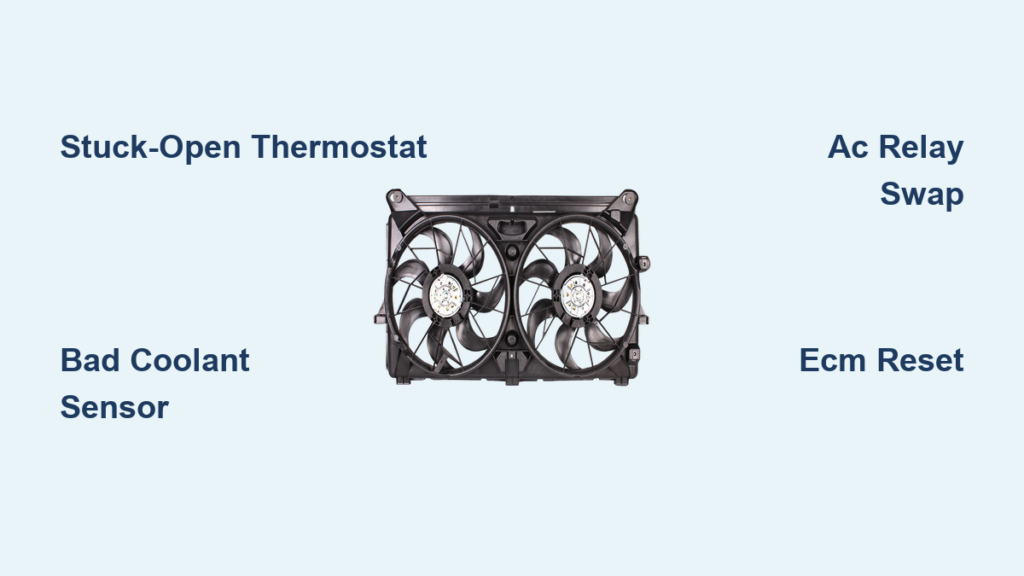
You turn off your Chevy Silverado, walk away, and hear the radiator fan still roaring. Ten minutes later, it is still running. A few days later, your battery is dead. This is not normal. While cooling fans run briefly after shutdown to manage residual heat, a fan that stays on for hours or until the battery drains signals a serious issue affecting many 2014 and 2015 Silverados with 4.3L, 5.3L, and 6.2L engines.
The problem is not always overheating. Often the temperature gauge stays stuck at 160°F, shows no signal, or the AC stops working while the fan runs nonstop. This behavior points to a system-wide fail-safe response, not just a faulty fan. The Engine Control Module is likely receiving bad data or detecting a fault, so it keeps the fans on to prevent engine damage. Left unresolved, this can kill your battery and leave you stranded.
In this guide, you will learn how to diagnose and fix the root cause rather than mask the symptom. Whether it is a stuck-open thermostat, failed coolant sensor, AC pressure issue, or relay fault, we walk through each step with clear, actionable fixes. You will also discover common mistakes, what to look for, and how to reset the system properly. Let us stop the fan and save your battery.
Decode the Fan Behavior
Identify Normal vs. Faulty Operation
All Silverados run their cooling fans after shutdown to cool the engine. Normal shutdown fan operation lasts under 10 minutes. If your fan runs longer, especially if it keeps going until the battery dies, you have a problem.
Watch for these key signs:
– Fan runs more than 30 minutes after turning off the truck
– Battery drains within 2 to 3 days of parking
– Fan runs at full speed even when the engine is cold
– Temperature gauge stays at 160°F and never rises
– No temperature signal displayed on the dash
If you disconnected the battery and the fan stayed off for a few days before returning, that is a classic sign the ECM reset, but the underlying fault remains. This is not a glitch. It is your truck’s fail-safe mode kicking in because it thinks the engine is overheating or missing critical data.
Check for Related System Failures
The cooling fan does not work alone. It is tied to multiple systems. If your AC is not cooling even on max cold, or the transmission temperature display vanishes, you are dealing with a broader communication or sensor failure.
These are not coincidences:
– AC pressure issues can trigger continuous fan operation
– Loss of transmission temp data suggests a network or ground fault
– No coolant temp signal forces the ECM into protection mode
Use this checklist:
– Fan runs over 10 minutes after shutdown
– Temp gauge stuck at 160°F or shows no signal
– AC blows warm air
– Transmission temp missing from display
– Battery drains after 48 hours
If three or more apply, focus on sensor, thermostat, or communication faults rather than just the fan motor.
Diagnose the Coolant System

Test for a Stuck-Open Thermostat
A stuck-open thermostat is one of the most common causes of nonstop fan operation. When the thermostat fails open, coolant flows freely through the radiator even when the engine is cold. The engine never reaches optimal temperature, so the ECM sees a problem and keeps the fans on as a safety measure.
Symptoms of a stuck-open thermostat include:
– Engine takes forever to warm up
– Temperature gauge never rises above 160°F
– Heater blows lukewarm air even after 10 or more minutes of driving
– Fans run at full speed despite a cold engine
To test, start the engine cold and monitor the temperature gauge. If it does not rise after 10 to 15 minutes of driving, the thermostat is likely stuck open.
Pro Tip: Do not assume a new thermostat is good. Some aftermarket units fail prematurely. Use OEM or high-quality replacements from trusted brands like ACDelco or Gates.
Replace the Thermostat Properly
Replacing the thermostat requires draining coolant and careful reinstallation.
Tools and materials needed:
– Socket set
– Drain pan
– New thermostat and gasket
– About 1 gallon of Dex-Cool or equivalent coolant
– Torque wrench (recommended)
Steps:
1. Let the engine cool completely.
2. Place a drain pan under the radiator petcock.
3. Open the petcock and drain at least 1 gallon of coolant.
4. Locate the thermostat housing at the front of the engine where the upper radiator hose connects.
5. Remove the two bolts and take off the housing.
6. Pull out the old thermostat and inspect for debris.
7. Clean the mating surface thoroughly.
8. Install the new thermostat with the jiggle valve up.
9. Replace the gasket or apply sealant if required.
10. Reinstall the housing and torque bolts to 10 ft-lbs.
11. Refill coolant and bleed air by running the engine with the radiator cap off.
12. Top off and recheck after cooling.
After replacement, disconnect the battery for 15 minutes to reset the ECM. This clears any learned fault patterns.
Check Sensor and Signal Issues

Verify Coolant Temperature Sensor Function
The Coolant Temperature Sensor tells the ECM how hot the engine is. If it fails or sends no signal, the ECM defaults to worst-case scenario and runs the fans nonstop to prevent overheating. Even a brand-new sensor can be defective out of the box. If you replaced the thermostat and the fan still runs, suspect the CTS.
How to test:
1. Locate the CTS near the thermostat housing or cylinder head.
2. Unplug the electrical connector.
3. Use a multimeter to check resistance:
– Cold engine: about 2,000 to 3,000 ohms
– Warm engine: about 200 to 300 ohms
4. If resistance is out of range or infinite, replace the sensor.
Warning: Do not just swap sensors blindly. If the new one does not fix it, check the wiring and ground. A broken wire or corroded connector can mimic a bad sensor.
Diagnose AC Pressure Sensor Faults
The cooling fans also help cool the AC condenser. If the AC pressure sensor detects low refrigerant, high pressure, or air in the system, it can trigger continuous fan operation even if the AC is off.
Signs of AC-related fan issues:
– Fan runs constantly only after AC use
– AC blows warm or ambient air
– Pressure readings show undercharge or overcharge
What to do:
– Have the AC system pressure-checked by a technician
– Look for leaks or recent refrigerant top-offs
– If the system was recently serviced, air in the lines can cause false high-pressure signals
A quick check is to turn the AC on full cold. If the fan changes speed or shuts off, the AC system is involved. If not, the issue is likely elsewhere.
Inspect Electrical Components
Swap the AC Control Relay
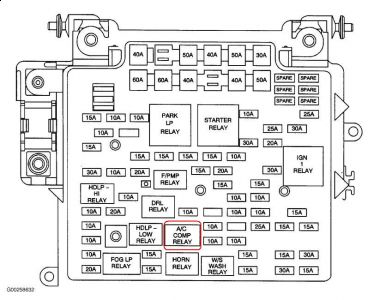
The AC control relay, often labeled #68 in the under-hood fuse box, plays a key role in fan operation. While relay failure is statistically rare, swapping it is a fast, no-cost diagnostic step. A stuck relay can keep power flowing to the fan control module, bypassing normal shutdown logic.
How to test:
1. Open the fuse box near the battery.
2. Find relay #68 (AC control relay).
3. Swap it with a known-good identical relay such as the horn or fuel pump relay.
4. Start and stop the truck and observe whether the fan still runs.
If the fan stops, replace the relay. Use OEM or high-quality aftermarket brands like Bosch. Do not assume the relay is bad because it clicks. A relay can click but still fail internally.
Inspect Wiring and Grounds
Faulty grounds or damaged wiring can disrupt sensor signals and cause the ECM to misread conditions.
Common problem areas include:
– Ground near the battery or fender
– Wiring harness near the thermostat housing
– Connector for the coolant temperature sensor
Check for corrosion on ground straps, pinched or frayed wires, and loose or oxidized connectors. Clean ground points with a wire brush, secure connections, and apply dielectric grease on electrical plugs to prevent future corrosion.
Reset the System Logic
Perform a Full ECM Reset
The ECM can get stuck in a fault loop, especially after sensor failures. A battery disconnect resets the system and clears temporary codes.
Steps:
1. Turn off the ignition.
2. Disconnect the negative battery terminal.
3. Wait 15 to 20 minutes to drain capacitors and clear memory.
4. Reconnect the battery.
5. Start the engine and let it idle for 5 minutes.
After the reset, monitor fan behavior, check if the temperature gauge responds normally, and test AC performance. If the problem returns within a week, the root cause is still present. The reset only cleared the symptom temporarily.
Use an OBD2 Scanner for Live Data
A basic OBD2 scanner can reveal what the ECM is seeing.
Look for:
– Pending codes even if no Check Engine Light is on
– Live data including coolant temp, fan speed command, and AC pressure
– Transmission temperature reading
Key clues include:
– Coolant temp shows -40°F, which indicates an open circuit from a bad sensor or wiring
– Coolant temp shows 210°F but gauge reads 160°F, which indicates a signal mismatch
– Fan speed command says “High” but engine is cold, which means fail-safe is active
If you see no data for coolant or transmission temp, suspect a communication bus issue or module failure.
Prevent Future Failures
Use Quality Parts and Proper Maintenance
Cheap thermostats and sensors fail faster. Stick with OEM or premium aftermarket parts from brands like ACDelco, Denso, or Gates.
Recommended maintenance:
– Replace coolant every 5 years or 100,000 miles
– Inspect thermostat and sensors during coolant service
– Check AC refrigerant levels annually
Avoid using stop-leak products or non-OEM coolant, as these can clog sensors and damage the cooling system.
Monitor for Early Warning Signs
Catch issues early by watching for:
– Slow warm-up in winter
– AC performance drop
– Fan running longer than usual
– Fluctuating temp gauge
Any of these could signal a developing problem before it kills your battery.
Know When to See a Pro
If you have replaced the thermostat, sensor, and relay and the fan still runs, consider dealership-level diagnostics that can test CAN bus communication, warranty claims if under an extended service contract, and harness or ECM testing. Some 6.2L models show transmission data loss with fan issues, which may require advanced module diagnostics.
Frequently Asked Questions About Chevy Silverado Fan Not Turning Off
How long should the cooling fan run after shutting off the engine?
Normal fan operation after shutdown lasts under 10 minutes. If the fan runs longer than 30 minutes or continues until the battery dies, the system has a fault.
Why does my Silverado temperature gauge stay at 160°F?
A gauge stuck at 160°F that never rises usually points to a stuck-open thermostat. Coolant flows too freely, and the engine never reaches operating temperature.
Will disconnecting the battery fix the fan issue?
Disconnecting the battery resets the ECM and may silence the fan temporarily. However, if the underlying fault remains, the problem usually returns within days or weeks.
Can a bad AC pressure sensor cause the fan to run constantly?
Yes. The AC pressure sensor influences fan operation. Low refrigerant, air in the lines, or a faulty sensor can trigger continuous fan engagement even when the AC is off.
What is relay #68 and why does it matter?
Relay #68 is the AC control relay in the under-hood fuse box. It helps control fan engagement based on AC demand. Swapping it with a known-good relay is a quick diagnostic step.
Should I use OEM parts for thermostat replacement?
Yes. Low-quality aftermarket thermostats fail open more often. OEM parts or trusted brands like ACDelco and Gates provide better long-term reliability.
Key Takeaways for Fixing Your Chevy Silverado Fan Issue

A Chevy Silverado fan that will not turn off is usually caused by a stuck-open thermostat or sensor failure triggering the ECM’s fail-safe mode. Start with the thermostat and coolant sensor, verify AC system health, swap the AC relay, and reset the ECM. Use quality parts and scan for live data to confirm the fix. Address it early, before your next jump start becomes a tow.



